
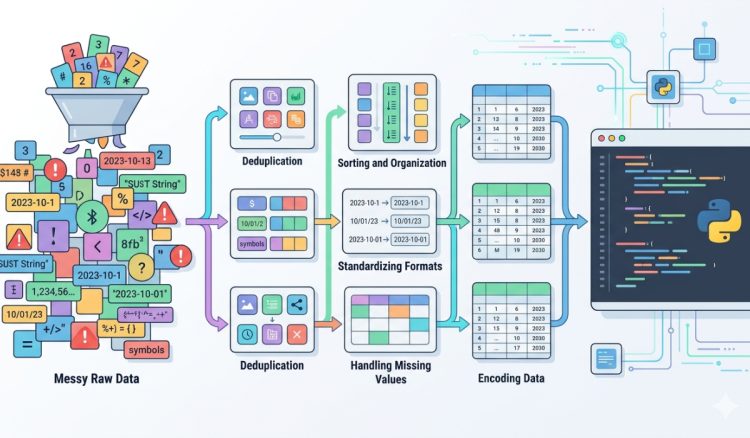
Raw data rarely arrives in a clean and structured format. It comes from logs, spreadsheets, scraped content, APIs, and manual inputs. Each source introduces inconsistencies that can quietly break Python scripts or lead to unreliable results. A missing delimiter, an extra space, or duplicated rows can cause hours of debugging later. Developers who take time to clean and format data before processing gain a huge advantage. They reduce errors, simplify logic, and make their code easier to maintain.
Quick Overview
- Clean data reduces runtime errors and unexpected behavior
- Formatting improves readability and consistency
- Structured inputs make automation more reliable
- Simple preprocessing steps save time during debugging
Why Clean Data Matters Before Running Python Scripts
Python is flexible, but it expects predictable inputs. When data is inconsistent, scripts must compensate with extra checks, conditions, and fallback logic. This increases complexity and slows down development. Clean data removes that burden. Instead of writing defensive code, developers can focus on solving the actual problem.
Consider working with CSV exports from different tools. One file may use commas, another uses semicolons, and a third includes mixed formatting. Before running any script, it helps to normalize the structure and count lines to verify the dataset size and consistency. Knowing how many rows exist and whether the structure is uniform gives a clear starting point.
Structured input also improves performance. Python processes well-organized data faster because there are fewer exceptions to handle. This is especially noticeable when working with large datasets or automation pipelines that run repeatedly.
Start With Removing Noise and Irrelevant Characters
Raw text often contains hidden noise. This includes extra spaces, inconsistent casing, tabs, and invisible characters. These small issues may seem harmless, but they can cause mismatches when filtering or comparing values. Cleaning this noise early prevents subtle bugs.
One effective approach is to standardize whitespace and casing. Converting all text to lowercase and trimming leading or trailing spaces ensures consistency. This is particularly useful when working with user inputs or scraped data where formatting varies widely.
For larger datasets, using a string-handling basics workflow helps break down and normalize text efficiently. Python provides built-in methods that simplify these transformations, making preprocessing both fast and readable.
Split and Structure Data Into Predictable Formats
Unstructured text is difficult to process. Turning it into structured data is one of the most important preprocessing steps. This often involves splitting text into columns, lists, or key-value pairs. Once structured, Python can easily iterate, filter, and transform the data.
A practical way to handle this is by using a delimited text tool. It allows developers to quickly separate raw text into clean columns without writing custom parsing logic. This is especially useful when dealing with exported data that does not follow strict formatting rules.
After splitting the data, the next step is to ensure consistency across all rows. Each row should have the same number of fields. Missing values should be handled carefully, either by filling defaults or removing incomplete entries.
Common Data Cleaning Tasks Developers Should Always Apply
Every dataset has its own quirks, but certain cleaning steps apply almost universally. These steps form a reliable preprocessing workflow that reduces surprises during execution.
- Trim whitespace from all fields
- Standardize text casing across columns
- Remove duplicate rows to avoid skewed results
- Validate data types before processing
- Handle missing or null values consistently
Each of these steps addresses a common source of error. For example, duplicate entries can inflate counts or distort analysis. Missing values can break calculations or produce incorrect outputs. Handling these issues early ensures that scripts behave as expected.
Organizing Data Improves Script Readability and Maintenance
Clean data not only benefits execution. It also improves how developers interact with their code. When inputs are predictable, scripts become easier to read and modify. There is less need for complex condition handling or defensive programming patterns.
Structured datasets also make debugging faster. If something goes wrong, it is easier to trace the issue back to a specific row or column. This reduces time spent searching through messy inputs and allows developers to focus on fixing the root cause.
For workflows involving collections, developers often rely on lists and dictionaries as guide techniques to organize structured data. These data structures are powerful when the input is clean and consistent.
Simple Formatting Techniques That Save Time
Formatting is not just about appearance. It directly affects how data is processed. Consistent formatting ensures that parsing logic works reliably across different datasets. It also makes outputs easier to understand and verify.
- Use consistent delimiters across all files
- Ensure numeric values do not include stray characters
- Normalize date formats before parsing
- Align column ordering for predictable indexing
These small adjustments reduce friction during processing. They also make datasets easier to share and reuse across different scripts or teams.
Visualizing the Impact of Clean vs Messy Data
| Aspect | Messy Data | Clean Data |
|---|---|---|
| Processing Speed | Slower due to checks | Faster and efficient |
| Error Rate | High chance of failure | Reduced errors |
| Readability | Difficult to interpret | Clear and structured |
| Maintenance | Complex and time-consuming | Simple and scalable |
Handling Real-World Data Scenarios
In real projects, data rarely behaves perfectly. APIs may return inconsistent formats. User inputs can include unexpected characters. Logs often contain mixed content that needs to be filtered before analysis. Preparing for these scenarios requires a flexible cleaning approach.
One useful strategy is to build reusable preprocessing functions. These functions can handle common tasks such as trimming text, validating formats, and removing duplicates. By applying these consistently, developers can standardize their workflows across different projects.
External references like software quality standards emphasize the importance of reliable input handling. Clean data is not just a convenience; it is part of building robust and dependable systems.
Balancing Automation and Manual Checks
Automation speeds up preprocessing, but manual checks still play a role. Before feeding data into a script, it helps to review a small sample. This ensures that cleaning rules are applied correctly and that no important information is lost during transformation.
Combining automation with quick inspections creates a balanced workflow. Developers can process large datasets efficiently while maintaining confidence in the results. This approach reduces the risk of silent errors that only appear later in production.
Building a Reliable Data Preparation Habit
Cleaning and formatting data should not be treated as an optional step. It should be part of every development routine. By making preprocessing a habit, developers can avoid repeated issues and create more reliable scripts.
This habit also improves collaboration. When data is consistently formatted, it becomes easier for teams to share and reuse datasets. Everyone works with the same structure, reducing confusion and miscommunication.
Over time, these small improvements add up. Scripts become faster to write, easier to debug, and more dependable in real-world scenarios. Clean inputs lead to better outputs, and that consistency is what makes automation truly effective.
Where Clean Inputs Lead Your Python Projects
Every Python script depends on the quality of its input. Clean and well-formatted data removes unnecessary obstacles and allows code to run as intended. It simplifies logic, improves performance, and reduces the risk of unexpected errors.
Taking a few extra minutes to clean data before processing can save hours later. It transforms messy inputs into structured datasets that are easy to work with. This shift in approach changes how developers build and maintain their scripts.
Reliable automation starts with reliable data. By focusing on simple cleaning and formatting steps, developers create a stronger foundation for every project they build.
